Showing posts with label ORACLE. Show all posts

Monday, October 16, 2023

Problem with database open ORA-19804, ORA-19809, ORA-03113

1. Try to login to database with SYS AS SYSDBA user. If the instance is idle, run the startup command.


2. If ORA-03113 occured, check the latest error in log file, C:\Oracle\diag\rdbms\SERVICE_NAME\SERVICE_NAME\alert\log.txt

3. Error description: 
ORA-19809: limit exceeded for recovery files ORA-19804: cannot reclaim X bytes disk space from X bytes limit

4. Login to database with SYS AS SYSDBA user and run startup mount command.

5. Check the current recovery file size limit with query: select space_limit/1024/1024 as limit, space_used /1024/1024 as used from v$recovery_file_dest;

6. Change the limit with command alter system set db_recovery_file_dest_size = 30G scope=both; run  COMMIT; 

7. Run shutdown and startup commnds.

Saturday, August 26, 2023

Oracle - create public database link to oracle db

 1. Change sqlnet.ora file from SQLNET.AUTHENTICATION_SERVICES= (NTS) to SQLNET.AUTHENTICATION_SERVICES= (NONE)


2. Create public database link with command:

CREATE PUBLIC DATABASE LINK DBLINK1

    CONNECT TO REMOTE_USER_NAME IDENTIFIED BY password

    USING '(DESCRIPTION =

    (ADDRESS = (PROTOCOL = TCP)(HOST = 10.1.1.2 )(PORT = 1521))

    (CONNECT_DATA =

      (SERVER = DEDICATED)

      (SERVICE_NAME = ORCL)

    )

  )';

COMMIT;


3. Test link with command:

select * from table_name@DBLINK1;


4. Drop link with command:

DROP  DATABASE LINK DBLINK1;

COMMIT;

Oracle - calculate time difference with time_zone adjustment

Task: Calculate difference between CREATEDON  column (with UTC time_zone) and CURRENT_DATE (with local time zone from database) 

Table contents:

select CREATEDON, CURRENT_DATE from TABLE_NAME;


Query:

with time_difference as

(

select

cast(FROM_TZ(CAST(CREATEDON AS TIMESTAMP), 'UTC') at time zone (SELECT DBTIMEZONE FROM DUAL)  as date) AS Created,

cast(FROM_TZ(CAST(CURRENT_DATE AS TIMESTAMP), (SELECT DBTIMEZONE FROM DUAL)) AS DATE) AS CurrentDate

from TABLE_NAME


)

select 

to_char(Created,'YYYY-mm-dd HH24:MI') as Created,

to_char(CurrentDate ,'YYYY-mm-dd HH24:MI') as CurrentDate,

round((CurrentDate - Created) * 24 * 60) as DifferenceInMinutes

from time_difference;


Result:


Wednesday, September 18, 2019

SSIS - odbc oracle delete query

SSIS - problem with odbc oracle delete query


SQL delete query which is not affecting any records will return the result SQL_NO_DATA. SSIS odbc is not able to handle this kind of result.

1. Create query with dual select at the end
delete from table;
select 1 from dual;

2. Create procedure to delete data

create or replace PROCEDURE  delete_table is
begin
delete from table;
end;


Source: https://stackoverflow.com/questions/55000421/delete-statement-fails-when-called-from-ssis

SSIS - Call oracle procedure from Microsoft SQL Server integration services

SSIS - Call oracle procedure from Microsoft SQL Server integration services


1. Create sample procedure f.e.

create or replace PROCEDURE  schema1.delete_proc is
begin
delete from table;
end;

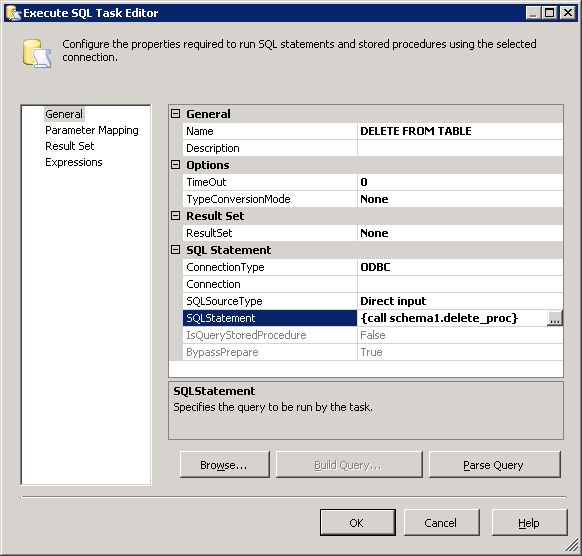
2. Add Execute SQL Task component at your ssis project with following parameters


3. Syntax
{CALL <schema>.<procedure>}
{CALL <schema>.<procedure>(parameter1='value1')}


Tuesday, April 16, 2019

APEX 5 - interactive report scale resize image

APEX 5 - interactive report re-size image


1. Add image column to interactive report
2. Add blob attributes (image column at your report should be primary key for table with blob content)
3. Add Static ID for your image column (f.e. IDP)
4. Add HTML Header in Page Properties
f.e.

<style type="text/css">
td[headers="IDP"] > img
width: 150px;
}
</style>


Monday, November 26, 2018

ORACLE RMAN: Delete archivelogs older than X hours batch

ORACLE RMAN: Delete archive logs older than X hours

Oracle, RMAN


1. Create .bat script to start rman script

rman @C:\RMAN_delete.rman


2. Create rman script at location from previous script. Script is deleting archive logs older than hours without prompting.

CONNECT TARGET SYS/SysPassword
RUN
{
DELETE NOPROMPT ARCHIVELOG UNTIL TIME 'sysdate-12/24';
}
EXIT;


3. Schedule .bat script at windows scheduler

4. Additionally setup retention policy at RMAN as below


Tuesday, February 6, 2018

ORACLE: Microsoft Access x64 connect to x86 oracle data source (workaround)

ORACLE: Microsoft Access x64 connect to x86 oracle data source (workaround)

Microsoft Access, Oracle

1. Install oracle drivers

2. Fill tnsnames.ora oracle file with connection to your server

Location i.e. : 
\oracle\product\10.2.0\client_1\network\admin
C:\app\oracle\product\11.2.0\client_1\Network\Admin

3. Add odbc connection 
C:\Windows\syswow64\odbcad32.exe

User: Oracle user name
Server: Server name from TNS names


4. Create symbolic link, junction to C:\Program Files (x86)

cmd

mklink /J "C:\Program Files (x86)\" "Program_Files_86"


5. Create shortcut "Micorsoft Access (x86) to Microsoft Access application with path below:

Location i.e. : 
 C:\Program_Files_86\Microsoft Office\OFFICE11\MSACCESS.exe
 C:\Program_Files_86\Microsoft Office\OFFICE12\MSACCESS.exe

6. Start Microsoft Access from shortcut and run odbc connection

Tuesday, January 30, 2018

ORACLE: scheduled task (oracle scheduler)

ORACLE - Scheduled task (Oracle scheduler)

Oracle, PL/SQL


1. Create a program

Procedure name: READ_FILES_PROC

begin
dbms_scheduler.create_program(
       program_name => 'READ_FILES_PROG'
      ,program_type => 'STORED_PROCEDURE'
      ,program_action => 'READ_FILES_PROC'
      ,number_of_arguments => 0
      ,enabled => true
      ,comments => 'Read files from directory' );
end;


2. Create a schedule


Additional parameters info:

BEGIN
DBMS_SCHEDULER.CREATE_SCHEDULE (
  schedule_name     => 'READ_FILES_SCH',
  start_date        => TO_TIMESTAMP('2014-06-28 06:15:00','YYYY-MM-DD HH24:Mi:SS'),
  end_date          => TO_DATE('9999-12-31','YYYY-MM-DD'),
  repeat_interval   => 'FREQ=MINUTELY; INTERVAL=15',
  comments          => 'Every 15 minutes');
END;

3. Create a job


begin
  dbms_scheduler.create_job(
       job_name => 'READ_FILES_JOB'
     , program_name =>'READ_FILES_PROG'
     , schedule_name =>'READ_FILES_SCH'
     , enabled => TRUE
     , comments => 'Read files every 15 minutes');
end;

4. Enable log


begin
DBMS_SCHEDULER.SET_ATTRIBUTE('READ_FILES_JOB','logging_level',DBMS_SCHEDULER.LOGGING_FULL);
end;

5.  Restart job and read log


Disable job
begin
DBMS_SCHEDULER.DISABLE('READ_FILES_JOB',TRUE);
end;
Enable job
begin
DBMS_SCHEDULER.ENABLE('READ_FILES_JOB');
end;
Display log
select * from dba_scheduler_jobs where owner like 'SCHEMA NAME';


Tuesday, January 23, 2018

SAP/ABAP: Connection to external database

SAP/ABAP: Connection to external database

SAP, ORACLE, ABAP

1. Transaction code: ST04 - Add connection


2. Press “Add DB Entry” and provide database information


3. Transaction code: DBCO and provide database password


Example INSERT INTO database


DATA:
     CONNECTION LIKE DBCON-CON_NAME VALUE 'TEST'.

Code section: Record processing:


EXEC SQL.
CONNECT TO :CONNECTION
ENDEXEC.

IF SY-SUBRC = 0.
EXEC SQL.
    SET CONNECTION :CONNECTION
ENDEXEC.
EXEC SQL.
INSERT INTO Table1 (Name)
VALUES ('Adam')
ENDEXEC.

EXEC SQL.
COMMIT
ENDEXEC.

EXEC SQL.
DISCONNECT :CONNECTION
ENDEXEC.
ENDIF.


Example SELECT FROM database
TYPES:

BEGIN OF TY_TABLE1,
NAME1 TYPE C LENGTH 40
END OF TY_TABLE1.
DATA:
C1 LIKE DBCON-CON_NAME VALUE 'TEST',
S_TABLE1 TYPE TY_TABLE1,

Z_NAME TYPE C LENGTH 40.

Code section: Record processing:
EXEC SQL.
     CONNECT TO :C1
ENDEXEC.
  IF SY-SUBRC = 0.
     EXEC SQL.
       SET CONNECTION :C1
     ENDEXEC.
     EXEC SQL.
       open dbcursor for select distinct Name
       from Table1
     ENDEXEC.
     DO.
       CLEAR S_TABLE1 .
       EXEC SQL.
         FETCH NEXT dbcursor INTO :S_TABLE1
       ENDEXEC.
       if sy-subrc = 0.
         Z_NAME = S_TABLE1-NAME1.
       else.
         exit.
       endif.
     ENDDO.
     EXEC SQL.
       close dbcursor
     ENDEXEC.
     EXEC SQL.
       DISCONNECT :C1
     ENDEXEC.

   ENDIF.

SQL: group by number of rows (divide result into sections with particular number of rows)

SQL: group by number of rows

Oracle

Example shows how to divide "group by clause"result into sections with particular number of rows.

Table:
select column1 from table1;


Query:
Group capacity: 4
with query1 as
    (
    select 
    column1,
    row_number()  OVER (PARTITION BY column1  ORDER BY column1)-1 as c1
    from table1
    )
    select 
    column1,
    count(column1)
    from query1
    group by column1, floor(c1/4)
    order by column1, count(column1) desc

Result:

Problem with database open ORA-19804, ORA-19809, ORA-03113

1. Try to login to database with SYS AS SYSDBA user. If the instance is idle, run the startup command. 2. If ORA-03113 occured, check the la...