Showing posts with label SAP. Show all posts

Saturday, August 26, 2023

SAP ABAP - save table results to csv file with SQ02/SQ01

  1.  Use path visible in transaction AL11
  2. Create SQ02 Query to read f.e. MSEG table
  3.  Put the script in the following sections of extras->code tab:

DATA:

DATAC_SEMI(1TYPE VALUE ';'.
DATAL_LINE TYPE STRING.
DATA: T_FILE(999TYPE C.
DATAL_TEMP TYPE STRING.

START OF SELECTION:

T_FILE = 'C:\101movement.txt'.

OPEN DATASET T_FILE FOR OUTPUT IN TEXT MODE
ENCODING DEFAULT
WITH SMART LINEFEED.
CONCATENATE
       'Material'
       'Quantity'
       'Movement'
       INTO L_LINE
       SEPARATED BY C_SEMI.
TRANSFER L_LINE TO T_FILE.

RECORD PROCESSING:


CLEAR L_LINE.
CLEAR L_TEMP.

L_TEMP =  MSEG-MENGE.


* Row creation with output to csv
  CONCATENATE
            MSEG-MATNR
            L_TEMP
            MSEG-BWART
            INTO L_LINE
            SEPARATED BY C_SEMI.
  TRANSFER L_LINE TO T_FILE.
ENDLOOP.

END OF SELECTION (after List):

close dataset T_FILE.

Wednesday, March 29, 2023

How to read table from remote SAP system - reading HU from SAP EWM from SAP ECC


How to read table from remote SAP system - reading HU from SAP EWM from SAP ECC

Sample code to read HU number VLENR from table /SCWM/ORDIM_C in SAP EWM from another SAP.


DATA
T_OPTION TYPE RFC_DB_OPT.
DATAT_OPTIONS TYPE TABLE OF RFC_DB_OPT WITH HEADER LINE.
DATAT_FIELDS  TYPE TABLE OF RFC_DB_FLD WITH HEADER LINE.
DATAT_DATA    TYPE TABLE OF TAB512     WITH HEADER LINE.

P_DEST =  'RFC name of the EWM system'.

* Field we are going to read
T_FIELD-fieldname 'VLENR'.
append T_FIELD TO T_FIELDS.

* Filter over warehouse task field
CONCATENATE 'TANUM = 100012344'.
append T_OPTIONS TO T_OPTIONS.

* Connection to EWM in order to read table /SCWM/ORDIM_C

CALL FUNCTION 'RFC_READ_TABLE'
DESTINATION P_DEST
  EXPORTING
    QUERY_TABLE                '/SCWM/ORDIM_C'
*   DELIMITER                  = ' '
*   NO_DATA                    = ' '
*   ROWSKIPS                   = 0
    ROWCOUNT                   999
  TABLES
  OPTIONS                    T_OPTIONS
    FIELDS                   T_FIELDS
    DATA                     T_DATA.
* EXCEPTIONS
*   TABLE_NOT_AVAILABLE        = 1
*   TABLE_WITHOUT_DATA         = 2
*   OPTION_NOT_VALID           = 3
*   FIELD_NOT_VALID            = 4
*   NOT_AUTHORIZED             = 5
*   DATA_BUFFER_EXCEEDED       = 6
*   OTHERS                     = 7
          .
IF SY-SUBRC 0.
 * result to be retrieved from T_DATA
ENDIF.

Tuesday, June 7, 2022

SAP - configure connection with external system with SAP BC and rfc idoc communication

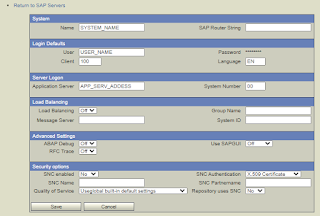
 1. SAP BC -> Adapters -> SAP -> Add sap server

(Previously create SAP user: SU01 tcode)


2. SAP BC -> Adapters -> SAP -> Choose SAP server -> Add listener to the server

(previously create PROGRAM_ID it in SMGW tcode)


3. Go to SAP BC-> Routing create routing rule for desired message typ


4. Create RFC connection in SM59 (test the connection)


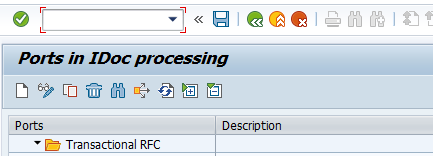
5. Create the transnational RFC port in WE21 (add rfc destination from SM59)


6. Create a logical system in BD54 


7.Create a partner profile with messages type in WE20


Thursday, January 27, 2022

ABAP - Editing segment, field values for multiple idocs

1. Data declarations

* Document number
DATAL_DOCNUM LIKE EDIDC-DOCNUM.

* Idoc data, status tables
DATAitab_edidd LIKE TABLE OF EDIDD WITH HEADER LINE,
      itab_edidc LIKE TABLE OF EDIDC WITH HEADER LINE,
      itab_edids LIKE TABLE OF EDI_DS40 WITH HEADER LINE.

* Variables for field positioning 
DATAP_SUM TYPE N LENGTH 4,
      I_POS type I,
      I_SUM type I,
      I_LEN type I.

2. Create select-option and parameters

tables EDIDC.

* Document number
select-options S_DOCNUM for EDIDC-DOCNUM
            OBLIGATORY NO INTERVALS .

* Name of the segment
parameters P_SNAME(100type C
            OBLIGATORY .

* Value of the field
parameters P_SVALUE(999type C
            OBLIGATORY .

* Position of the field in the segment
parameters P_POS(004type N
            OBLIGATORY .

* Length of the field
parameters P_LEN(004type N
            OBLIGATORY .


3. Program


datas_sel like line of S_DOCNUM.

*   Loop over select options
loop at S_DOCNUM into s_sel.

  CLEAR L_DOCNUM.
  CLEAR itab_edidc.
  CLEAR itab_edidd.
  CLEAR itab_edidc.

*   Asssign doc nbr
  L_DOCNUM s_sel-low.

  IF L_DOCNUM IS NOT  INITIAL.
  
  CALL FUNCTION 'EDI_DOCUMENT_OPEN_FOR_EDIT'
    EXPORTING
      DOCUMENT_NUMBER   L_DOCNUM
*     ALREADY_OPEN      = 'N'
    IMPORTING
      IDOC_CONTROL      itab_edidc
    TABLES
      IDOC_DATA         itab_edidd
    EXCEPTIONS
     DOCUMENT_FOREIGN_LOCK               1
     DOCUMENT_NOT_EXIST                  2
     DOCUMENT_NOT_OPEN                   3
     STATUS_IS_UNABLE_FOR_CHANGING       4
     OTHERS                              5
            .
  IF SY-SUBRC <> 0.
      MESSAGE ID SY-MSGID TYPE SY-MSGTY NUMBER SY-MSGNO
          WITH SY-MSGV1 SY-MSGV2 SY-MSGV3 SY-MSGV4.
  ENDIF.

    LOOP AT itab_edidd.
      IF itab_edidd-segnam P_SNAME.
        CLEAR P_SUM.
          
*   Calculate position of field
        I_POS P_POS.
        I_LEN P_LEN.
        I_SUM I_POS + I_LEN.
        P_SUM I_SUM.

*   Changing field value
        CONCATENATE
        itab_edidd-SDATA(P_POS)
        P_SVALUE(P_LEN)
        itab_edidd-SDATA+P_SUM INTO itab_edidd-SDATA
        RESPECTING BLANKS.
*   Modify table with segment contents
        MODIFY itab_edidd.

        EXIT.
      ENDIF.
    ENDLOOP.

    CALL FUNCTION 'EDI_CHANGE_DATA_SEGMENTS'
      TABLES
        idoc_changed_data_range itab_edidd
      EXCEPTIONS
        idoc_not_open           1
        data_record_not_exist   2
        OTHERS                  3.
    
    IF SY-SUBRC <> 0.
        MESSAGE ID SY-MSGID TYPE SY-MSGTY NUMBER SY-MSGNO
                WITH SY-MSGV1 SY-MSGV2 SY-MSGV3 SY-MSGV4.
    ENDIF.

   CALL FUNCTION 'EDI_CHANGE_CONTROL_RECORD'
      EXPORTING
        idoc_changed_control         itab_edidc
      EXCEPTIONS
        idoc_not_open                1
        direction_change_not_allowed 2
        OTHERS                       3.
   
    IF SY-SUBRC <> 0.
        MESSAGE ID SY-MSGID TYPE SY-MSGTY NUMBER SY-MSGNO
                WITH SY-MSGV1 SY-MSGV2 SY-MSGV3 SY-MSGV4.
    ENDIF.

*   Modify table with idoc status
      REFRESH itab_edids.
      itab_edids-docnum      L_DOCNUM.
      itab_edids-status      51.
      itab_edids-repid       sy-repid.
      itab_edids-mandt       sy-mandt.
      itab_edids-tabnam      'EDI_DS'.
      itab_edids-stamqu      'SAP'.
      itab_edids-stamid      'B1'.
      itab_edids-stamno      999.
      itab_edids-stapa1      ''.
      itab_edids-stapa2      ''.
      itab_edids-logdat      sy-datum.
      itab_edids-logtim      sy-uzeit.
      APPEND itab_edids.

    CALL FUNCTION 'EDI_DOCUMENT_CLOSE_EDIT'
      EXPORTING
       DOCUMENT_NUMBER        L_DOCNUM
       DO_COMMIT              'X'
       DO_UPDATE              'X'
       WRITE_ALL_STATUS       'X'
*    STATUS_75              = '30'
     TABLES
       STATUS_RECORDS         itab_edids
    EXCEPTIONS
      IDOC_NOT_OPEN          1
      DB_ERROR               2
      OTHERS                 3.
    
    IF SY-SUBRC <> 0.
        MESSAGE ID SY-MSGID TYPE SY-MSGTY NUMBER SY-MSGNO
                WITH SY-MSGV1 SY-MSGV2 SY-MSGV3 SY-MSGV4.
    ENDIF.

  ENDIF.
  endloop.

4. How to use selection screen

Example of modification of storage location in MBGMCR03 idoc (segment E1BP2017_GM_ITEM_CREATE).

Document number: provide all the document number (same type)
Segment name: E1BP2017_GM_ITEM_CREATE
Position of field STGE_LOC: 22 (Calculate all the previous fields in the segment 18+4)
Length field STGE_LOC: 4
Field value: name of storage location


Problem with database open ORA-19804, ORA-19809, ORA-03113

1. Try to login to database with SYS AS SYSDBA user. If the instance is idle, run the startup command. 2. If ORA-03113 occured, check the la...