Wednesday, September 18, 2019

SSIS - Call oracle procedure from Microsoft SQL Server integration services

SSIS - Call oracle procedure from Microsoft SQL Server integration services


1. Create sample procedure f.e.

create or replace PROCEDURE  schema1.delete_proc is
begin
delete from table;
end;

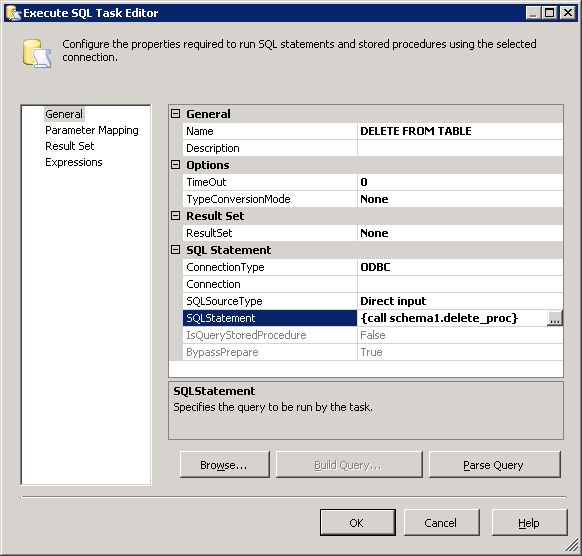
2. Add Execute SQL Task component at your ssis project with following parameters


3. Syntax
{CALL <schema>.<procedure>}
{CALL <schema>.<procedure>(parameter1='value1')}


Tuesday, April 16, 2019

APEX 5 - interactive report scale resize image

APEX 5 - interactive report re-size image


1. Add image column to interactive report
2. Add blob attributes (image column at your report should be primary key for table with blob content)
3. Add Static ID for your image column (f.e. IDP)
4. Add HTML Header in Page Properties
f.e.

<style type="text/css">
td[headers="IDP"] > img
width: 150px;
}
</style>


Thursday, December 6, 2018

SAP ABAP: Simple way to create ALV (REUSE_ALV_GRID_DISPLAY example)


1. Create report with internal table based on table spfli
2. Use function module REUSE_ALV_GRID_DISPLAY 

REPORT TEST.


data gs_spfli type spfli.
data it_spfli TYPE STANDARD TABLE OF spfli.

* select options
SELECT-OPTIONS so_carr for gs_spfli-carrid.


SELECT FROM spfli INTO TABLE it_spfli WHERE carrid in so_carr.


CALL FUNCTION 'REUSE_ALV_GRID_DISPLAY'
 EXPORTING
*   I_INTERFACE_CHECK                 = ' '
*   I_BYPASSING_BUFFER                = ' '
*   I_BUFFER_ACTIVE                   = ' '
*   I_CALLBACK_PROGRAM                = ' '
*   I_CALLBACK_PF_STATUS_SET          = ' '
*   I_CALLBACK_USER_COMMAND           = ' '
*   I_CALLBACK_TOP_OF_PAGE            = ' '
*   I_CALLBACK_HTML_TOP_OF_PAGE       = ' '
*   I_CALLBACK_HTML_END_OF_LIST       = ' '
    I_STRUCTURE_NAME                  'spfli' "Structure name
*   I_BACKGROUND_ID                   = ' '
*   I_GRID_TITLE                      =
*   I_GRID_SETTINGS                   =
*   IS_LAYOUT                         =
*   IT_FIELDCAT                       =
*   IT_EXCLUDING                      =
*   IT_SPECIAL_GROUPS                 =
*   IT_SORT                           =
*   IT_FILTER                         =
*   IS_SEL_HIDE                       =
*   I_DEFAULT                         = 'X'
*   I_SAVE                            = ' '
*   IS_VARIANT                        =
*   IT_EVENTS                         =
*   IT_EVENT_EXIT                     =
*   IS_PRINT                          =
*   IS_REPREP_ID                      =
*   I_SCREEN_START_COLUMN             = 0
*   I_SCREEN_START_LINE               = 0
*   I_SCREEN_END_COLUMN               = 0
*   I_SCREEN_END_LINE                 = 0
*   I_HTML_HEIGHT_TOP                 = 0
*   I_HTML_HEIGHT_END                 = 0
*   IT_ALV_GRAPHICS                   =
*   IT_HYPERLINK                      =
*   IT_ADD_FIELDCAT                   =
*   IT_EXCEPT_QINFO                   =
*   IR_SALV_FULLSCREEN_ADAPTER        =
* IMPORTING
*   E_EXIT_CAUSED_BY_CALLER           =
*   ES_EXIT_CAUSED_BY_USER            =
  TABLES
    T_OUTTAB                          it_spfli "Internal table
* EXCEPTIONS
*   PROGRAM_ERROR                     = 1
*   OTHERS                            = 2
          .
IF SY-SUBRC <> 0.
* Implement suitable error handling here
ENDIF.

SAP ABAP: Simple class object example with execute

1. Report with static and class method execution

REPORT TEST_CALC. TYPES: RES TYPE P DECIMALS 4. *Class definition CLASS CCALC DEFINITION. PUBLIC SECTION. *Class methods METHODS ADD IMPORTING VALUE(CI1) TYPE I VALUE(CI2) TYPE I RETURNING VALUE(CRESULT) TYPE RES. METHODS SUBSTRACT IMPORTING VALUE(CI1) TYPE I VALUE(CI2) TYPE I RETURNING VALUE(CRESULT) TYPE RES. *Static methods CLASS-METHODS POWER IMPORTING VALUE(CI1) TYPE I VALUE(CTO2) TYPE I RETURNING VALUE(CRESULT) TYPE RES. PRIVATE SECTION. ENDCLASS. *Class implementation CLASS CCALC IMPLEMENTATION. METHOD ADD. CRESULT = CI1 + CI2. ENDMETHOD. METHOD SUBSTRACT. CRESULT = CI1 - CI2. ENDMETHOD. METHOD POWER. CRESULT = 1. DO CTO2 TIMES. CRESULT = CRESULT * CI1. ENDDO. ENDMETHOD. ENDCLASS. PARAMETERS: I1 TYPE I, I2 TYPE I. DATA: RESULT TYPE P DECIMALS 4, OCALC TYPE REF TO CCALC. START-OF-SELECTION. *Static method execution example RESULT = CCALC=>POWER( EXPORTING CI1 = I1 CTO2 = I2 ). WRITE: 'POWER result: ' , RESULT. * Class method execution example with object creation CREATE OBJECT OCALC. RESULT = OCALC->ADD( EXPORTING CI1 = I1 CI2 = I2 ). WRITE: 'ADD result: ' , RESULT. RESULT = OCALC->SUBSTRACT( EXPORTING CI1 = I1 CI2 = I2 ). WRITE : 'SUBSTRACT result: ' , RESULT.


2. Selection screen
 3. In order to add description to parameters I1 and I2 go to: Go to->Text element->Selection text


4. Result screen


Tuesday, November 27, 2018

SSIS SQL Server Integration Services - Using variable in SSIS Send Email Task, Send email to dynamic address

1. Create variables for FromLine, ToLine, Subject and Source

f.e EmailFrom, Email, EmailSource, EmailSubject


2. Fill variables (you can do it dynamically at script task)
3. Fill send email task as below

4. Fill expression tab as below


SAP ABAP: Get email from table with username

1. Create email variable at data section

DATAL_SMTP_ADDR type adr6-SMTP_ADDR.


2. Get username from ADR6 and USR21 tables

select ADR6~SMTP_ADDR INTO L_SMTP_ADDR FROM
  USR21 LEFT OUTER JOIN ADR6 On
   USR21~addrnumber =  ADR6~addrnumber
                and USR21~persnumber =  ADR6~persnumber
  WHERE USR21~BNAME sy-uname.
  ENDSELECT.

Monday, November 26, 2018

SSIS SQL Server Integration Services - execute query based on flat file csv datasource

SSIS SQL Server Integration Services - execute oracle query based on flat file csv datasource


1. Create variable to store file path

f.e. 

FilePath with value C:\file.txt
File.txt will be ";" separeted flat file. I will use second column of file with material numbers.

2. Create variable to store query you wish to execute

f.e Query which will later be referenced as User::Query

3. Create script task to read file contents and prepare query

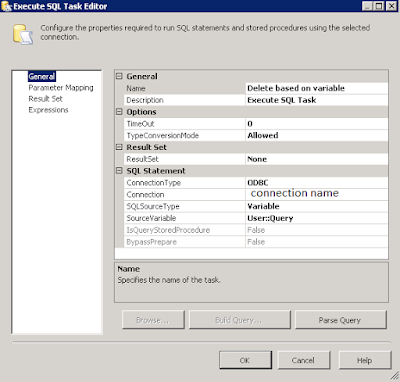
4. Create Execute SQL Task to run query created inside previous script task, using variable User::Query


// Script

public void Main() { // TODO: Add your code here //get file path string FilePath = Dts.Variables["User::FilePath"].Value.ToString(); string temp; string email = "przemyslaw.wawrzyczek@valeo.com"; string content = ""; int i = 0; bool contentExists = false ; // Open file reader StreamReader sr = new StreamReader(FilePath); // Loop while end of file, read line while ((temp = sr.ReadLine()) != null) { // Split into columns string[] columns = temp.Split(';'); // Skip header if (i > 0) { //Get distinct values if (!content.Contains(columns[1])) { // add value content += "'" + columns[1] + "',"; email = columns[12].ToString(); contentExists = true; } } else { // open bracket content = "("; } i++; } //remove last coma content = content.TrimEnd(','); //close bracket content += ")"; if (contentExists) { // create query and pass it into ssis variable Dts.Variables["User::Query"].Value = "BEGIN DELETE FROM TABLE WHERE material_number in " + content + "; COMMIT; END;"; Dts.Variables["User::Email"].Value = email; content = content.Replace("'", ""); Dts.Variables["User::EmailSubject"].Value += " " + content; Dts.TaskResult = (int)ScriptResults.Success; } else { Dts.Variables["User::Query"].Value = ""; Dts.TaskResult = (int)ScriptResults.Failure; } }
Problem with database open ORA-19804, ORA-19809, ORA-03113

1. Try to login to database with SYS AS SYSDBA user. If the instance is idle, run the startup command. 2. If ORA-03113 occured, check the la...