Tuesday, June 20, 2023

Baselinker - download orders & products with API getOrders() using excell vba

1. Get a key

How to:
https://baselinker.com/pl-PL/pomoc/wiedza/api/


I will XXXXXXX as a example of key = api token

2. Create a macro with POST method


Sub PostAPI(ByRef httpr, ByVal ldate)

myurl = "https://api.baselinker.com/connector.php"
httpr.Open "POST", myurl, False
httpr.setRequestHeader "Content-Type", "application/x-www-form-urlencoded"
params = "token=XXXXXXX&method=getOrders&parameters={" & Chr(34) & "date_from" & Chr(34) & ":+1" & ldate & "}"
httpr.send params

' Message box to uncomment in order to check error or result
' MsgBox (httpr.responseText)

End Sub

Sub Baselinker()
'
' PostREST Makro
'
Dim Json As Object
Dim httpRequest, ldate

Set httpRequest = CreateObject("msxml2.xmlhttp")

Sheets(1).Cells(1, 1).Value = "order_id"
Sheets(1).Cells(1, 2).Value = "date_confirmed"
Sheets(1).Cells(1, 3).Value = "delivery_address"

Sheets(1).Cells(1, 4).Value = "name"
Sheets(1).Cells(1, 5).Value = "price_brutto"


i = 2
o = 1
r = 1

While (r > 0)
    
        Call PostAPI(httpRequest, ldate)
        Set Json = JsonConverter.ParseJson(httpRequest.responseText)
        o = 1
        
        For Each Order In Json("orders")
        
         For Each Product In Order("products")

            Sheets(1).Cells(i, 1).Value = Order("order_id")
            ' Conversion of unix date format
            Sheets(1).Cells(i, 2).Value = DateAdd("s", Order("date_confirmed"), "1/1/1970 00:00:00")
            Sheets(1).Cells(i, 3).Value = Order("delivery_address")
            Sheets(1).Cells(i, 4).Value = Product("name")
            Sheets(1).Cells(i,5).Value = Product("price_brutto")
            
            ' save the last date
            ldate = Right(Order("date_confirmed"), 9)

            i = i + 1
            
            Next Product
        o = o + 1
    Next Order
    
    If o = 101 Then
        r = 1   
    Else
        r = 0
    End If
    
Wend

End Sub


Wednesday, March 29, 2023

How to read table from remote SAP system - reading HU from SAP EWM from SAP ECC


How to read table from remote SAP system - reading HU from SAP EWM from SAP ECC

Sample code to read HU number VLENR from table /SCWM/ORDIM_C in SAP EWM from another SAP.


DATA
T_OPTION TYPE RFC_DB_OPT.
DATAT_OPTIONS TYPE TABLE OF RFC_DB_OPT WITH HEADER LINE.
DATAT_FIELDS  TYPE TABLE OF RFC_DB_FLD WITH HEADER LINE.
DATAT_DATA    TYPE TABLE OF TAB512     WITH HEADER LINE.

P_DEST =  'RFC name of the EWM system'.

* Field we are going to read
T_FIELD-fieldname 'VLENR'.
append T_FIELD TO T_FIELDS.

* Filter over warehouse task field
CONCATENATE 'TANUM = 100012344'.
append T_OPTIONS TO T_OPTIONS.

* Connection to EWM in order to read table /SCWM/ORDIM_C

CALL FUNCTION 'RFC_READ_TABLE'
DESTINATION P_DEST
  EXPORTING
    QUERY_TABLE                '/SCWM/ORDIM_C'
*   DELIMITER                  = ' '
*   NO_DATA                    = ' '
*   ROWSKIPS                   = 0
    ROWCOUNT                   999
  TABLES
  OPTIONS                    T_OPTIONS
    FIELDS                   T_FIELDS
    DATA                     T_DATA.
* EXCEPTIONS
*   TABLE_NOT_AVAILABLE        = 1
*   TABLE_WITHOUT_DATA         = 2
*   OPTION_NOT_VALID           = 3
*   FIELD_NOT_VALID            = 4
*   NOT_AUTHORIZED             = 5
*   DATA_BUFFER_EXCEEDED       = 6
*   OTHERS                     = 7
          .
IF SY-SUBRC 0.
 * result to be retrieved from T_DATA
ENDIF.

Tuesday, June 7, 2022

Google BigQuery - simple function to read XML tags with Regex

 1. Simple SQL function to read XML tags from string using regex


CREATE OR REPLACE FUNCTION `PROJECT.TEST.readXML`(temp1 STRING, tag STRING) RETURNS STRING AS (
REGEXP_SUBSTR(temp1,CONCAT("<",tag,">(.*?)<\\/",tag,">"))
);


2. Usage of function

DECLARE example STRING DEFAULT "'<TELEGRAM><Equipment>Welding machine</Equipment><State>SENT</State></TELEGRAM>'";

SELECT 
TEST.readXML(example,"Equipment") as Equipment,
TEST.readXML(example,"State") as State,
TEST.readXML(example,"TELEGRAM") as TELEGRAM


Google BigQuery SQL - calculate production by each hour of the shift

1. Change the date of 3rd shift after midnight to day -1


SELECT  
    -- Change the date of 3rd shift after midnight to day -1
    IF (TIME(ProdDateTime) >= '00:00:00' and TIME(ProdDateTime) < '06:00:00',DATE_ADD(DATE(ProdDateTime)INTERVAL -1 DAY),DATE(ProdDateTime)) as Production_Date
...


2. Calculate the shift of production


SELECT  
    -- Calculate the shift
    IF (TIME(ProdDateTime) >= '06:00:00' and TIME(ProdDateTime) < '14:00:00'"1",
      IF (TIME(ProdDateTime) >= '14:00:00' and TIME(ProdDateTime) < '22:00:00'"2","3"))
    as Shift

...

3. Calculate the time difference between the beginning of the shift and production time


SELECT
 -- Calculate the time difference between the begining of the shift and production date
IF (TIME(ProdDateTime) >= '06:00:00' and TIME(ProdDateTime) < '14:00:00',TIME_DIFF(TIME(ProdDateTime),'06:00:00',HOUR)+1,
IF (TIME(ProdDateTime) >= '14:00:00' and TIME(ProdDateTime) < '22:00:00'TIME_DIFF(TIME(ProdDateTime),'14:00:00',HOUR)+1,
IF (TIME(ProdDateTime) >= '22:00:00' and TIME(ProdDateTime) <= '23:59:59'TIME_DIFF(TIME(ProdDateTime),'22:00:00',HOUR)+1,
TIME_DIFF(TIME(ProdDateTime),'00:00:00',HOUR)+1))) 
as HOUR_OF_PROD

...


4. Create the pivot table

WITH Production as
(
  SELECT  
    WorkCenter, SerialNumber, 
    -- Change the date of 3rd shift after midnight to day -1
    IF (TIME(ProdDateTime) >= '00:00:00' and TIME(ProdDateTime) < '06:00:00',DATE_ADD(DATE(ProdDateTime)INTERVAL -1 DAY),DATE(ProdDateTime)) as Production_Date,
    
    -- Calculate the shift
    IF (TIME(ProdDateTime) >= '06:00:00' and TIME(ProdDateTime) < '14:00:00'"1",
      IF (TIME(ProdDateTime) >= '14:00:00' and TIME(ProdDateTime) < '22:00:00'"2","3"))
    as Shift,

    -- Calculate the time difference between the begining of the shift and production date
    IF (TIME(ProdDateTime) >= '06:00:00' and TIME(ProdDateTime) < '14:00:00',TIME_DIFF(TIME(ProdDateTime),'06:00:00',HOUR)+1,
      IF (TIME(ProdDateTime) >= '14:00:00' and TIME(ProdDateTime) < '22:00:00'TIME_DIFF(TIME(ProdDateTime),'14:00:00',HOUR)+1,
      IF (TIME(ProdDateTime) >= '22:00:00' and TIME(ProdDateTime) <= '23:59:59'TIME_DIFF(TIME(ProdDateTime),'22:00:00',HOUR)+1,
      TIME_DIFF(TIME(ProdDateTime),'00:00:00',HOUR)+1))) 
    as HOUR_OF_PROD
FROM `PROJECT.TEST.TABLE`
)
select * from Production
PIVOT(COUNT(SerialNumber) FOR HOUR_OF_PROD IN (1,2,3,4,5,6,7,8))

5. Results


SAP - configure connection with external system with SAP BC and rfc idoc communication

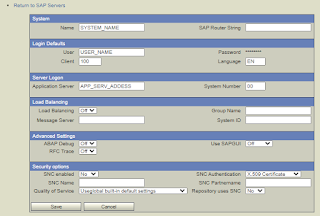
 1. SAP BC -> Adapters -> SAP -> Add sap server

(Previously create SAP user: SU01 tcode)


2. SAP BC -> Adapters -> SAP -> Choose SAP server -> Add listener to the server

(previously create PROGRAM_ID it in SMGW tcode)


3. Go to SAP BC-> Routing create routing rule for desired message typ


4. Create RFC connection in SM59 (test the connection)


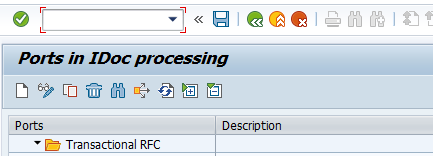
5. Create the transnational RFC port in WE21 (add rfc destination from SM59)


6. Create a logical system in BD54 


7.Create a partner profile with messages type in WE20


Thursday, January 27, 2022

Power shell - save sql query result to file

 1. Simple script to run query and save it to file


$fileName = 'FILE_PATH'


$SQLServer = "SERVER_NAME"  

$SQLDBName = "DATABASE_NAME"  

$userid ="USER_NAME"  

$password = "PASSWORD"   

$delimiter = ";"

$SqlQuery = "SELECT * FROM TABLE_NAME";


#SQL Query 

$SqlConnection = New-Object System.Data.SqlClient.SqlConnection  

$SqlConnection.ConnectionString = "Server = $SQLServer; Database = $SQLDBName; User ID = $userid; Password = $password;"

$SqlCmd = New-Object System.Data.SqlClient.SqlCommand  

$SqlCmd.CommandText = $SqlQuery  

$SqlCmd.Connection = $SqlConnection  

$SqlAdapter = New-Object System.Data.SqlClient.SqlDataAdapter  

$SqlAdapter.SelectCommand = $SqlCmd   


#Dataset  and save to file

$DataSet = New-Object System.Data.DataSet  

$SqlAdapter.Fill($DataSet)  

$DataSet.Tables[0] | export-csv -Delimiter $delimiter -Path $fileName -NoTypeInformation

Powershell - upload file to ftp

 1. Simple script for uploading files to ftp


$username = "FTP_USER"

$password = "FTP_PASSWORD"

$localFile = "LOCAL_FILE_PATH"

$remoteFile = "ftp://SERVER_ADDRESS/" + "FILENAME"


# Create FTP Rquest

$request = [System.Net.FtpWebRequest]::Create("$remoteFile")

$request = [System.Net.FtpWebRequest]$request

$request.Method = [System.Net.WebRequestMethods+Ftp]::UploadFile

$request.Credentials = new-object System.Net.NetworkCredential($username, $password)

$request.UseBinary = $true

$request.UsePassive = $true


# Read the File

$fileContent = gc -en byte $localFile

$request.ContentLength = $fileContent.Length

$run = $request.GetRequestStream()

$run.Write($fileContent, 0, $fileContent.Length)


# Close and dispose connection

$run.Close()

$run.Dispose()

Problem with database open ORA-19804, ORA-19809, ORA-03113

1. Try to login to database with SYS AS SYSDBA user. If the instance is idle, run the startup command. 2. If ORA-03113 occured, check the la...